The Google Business Profile setup families trust comes down to four things, checked in order: a specific category, services written in family language, steady answered reviews, and real faces.
Nobody schedules the search for home care. It gets scheduled for them, by a fall, a discharge date, or a doctor saying she shouldn’t be on her own anymore.
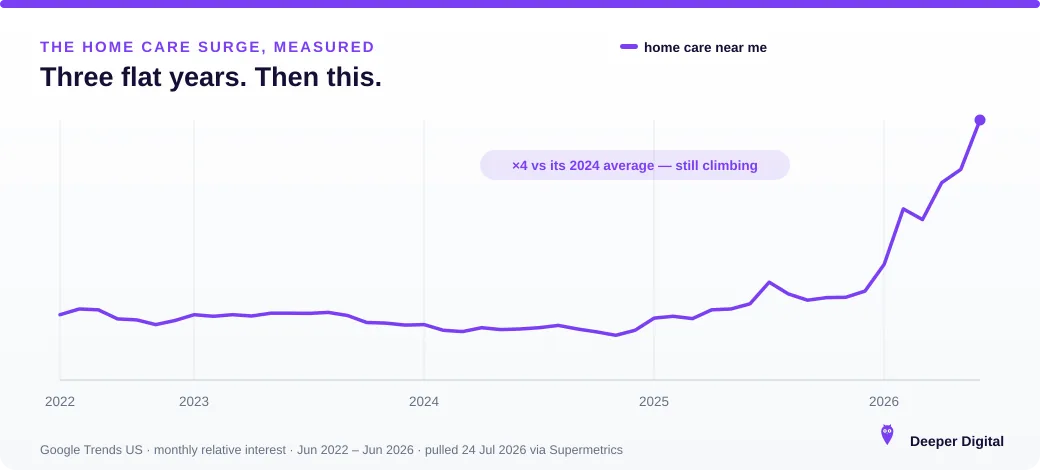
Whatever your profile looks like tonight is what gets judged. And searches are running about four times their 2024 average, which mostly means more families arriving at more half-built profiles. This is the setup that earns the call (category, services, reviews, faces), in the order families check them.
What’s the best Google Business Profile category for home care?
The most specific real category that matches your license. Clinical care: “Home health care service.” Non-medical companion or aged care: the closest specific match Google offers (search the category box for “home” and “aged”; don’t settle for a generic “Health consultant”).
The primary category decides which searches you’re eligible for (Google’s guidance is to pick the most specific one), and it’s the field we find set wrong most often on care agency profiles. Add honest secondaries for real service lines only; stuffing risks suspension. (How to get the category right.)
Which services should a home care agency list?
Every kind of care you staff, written the way families say it, not the way your license reads. Personal care and bathing assistance, companion care, dementia and Alzheimer’s care, respite care, overnight and 24-hour care, post-hospital recovery care, medication reminders.
The daughter searching at 11pm types “overnight care for elderly mother,” and if that’s a listed service with a plain one-sentence description, you’re eligible for exactly that search. (The Services section, properly.)
How do reviews work when your clients are elderly?
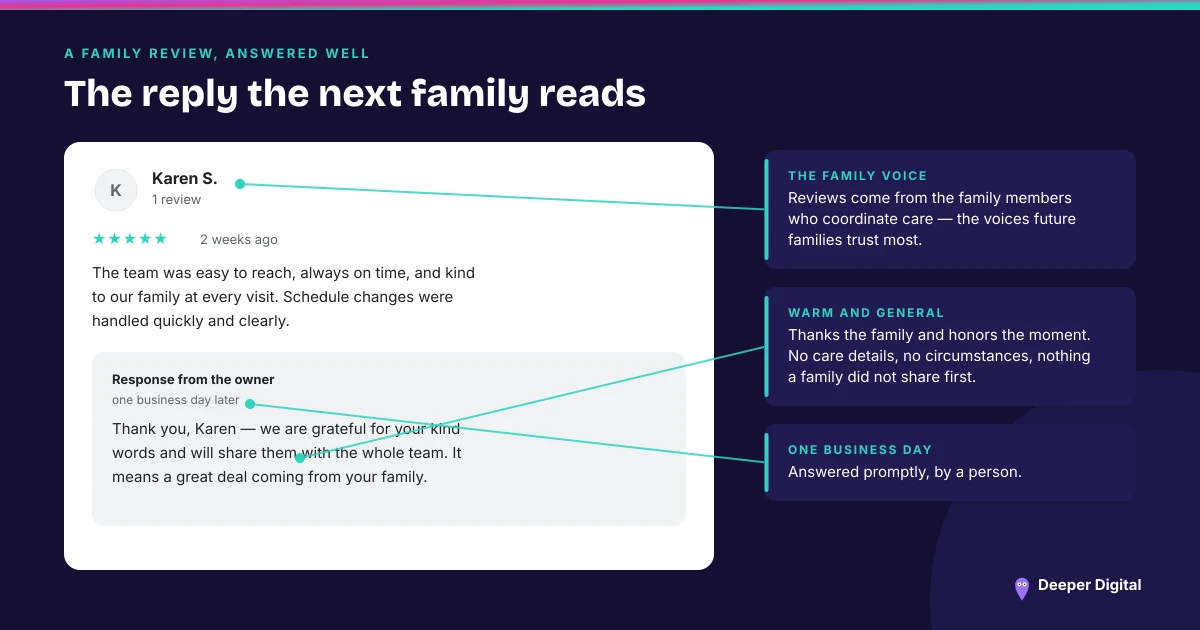
The reviews come from the family: the adult children who hired you and watched you care for their parent. That’s not a workaround. It’s the point.
Future families trust those voices most, and BrightLocal’s review research shows people read ~10 reviews before trusting a local business. For a decision about mom, assume more. Ask the coordinating family member after a good milestone: a smooth first month, a kind note from a caregiver.
Reply to every review warmly and generally: thank them, honor the family, never disclose care details. A steady flow of these is the strongest asset a care agency can own. (The ask-system · replies that sound human.)
What photos build trust for home care?
Faces. Your caregivers (with consent), your office team, your leadership. The people who’ll be in someone’s home.
Anonymous agencies lose to visible ones, because the search is fundamentally “can I trust these strangers with my mother?” No stock photos, ever. Families can tell, and the one thing you’re selling is trust. Add real photos steadily, a few each month. (Which photo goes where.)
What else decides who gets the call?
Coverage and freshness. List every city and town you actually staff (service-area settings, not just your office suburb), because “home care near me” is decided by where the searcher is.
Post weekly: a caregiver spotlight, a plain answer to a cost or insurance question (posts keep the profile alive). Seed the Q&A section with what families actually ask: cost, insurance and payment options, how fast care can start, how caregivers are screened.
Those payment questions are rising in search alongside care itself. Answering them in public wins the click. And when a family asks ChatGPT or Gemini who to trust, the consistent, complete profile is the one that gets named.
Is “Google My Business” still what a home care agency manages?
It is the same profile under an older name. Google renamed Google My Business to Google Business Profile in November 2021 and retired the standalone Google My Business app in July 2022.
Management moved into Google Search and Google Maps, and the multi-location dashboard became Business Profile Manager. The profile did not change. The door to it did.
That matters more in home care than in most trades, because these profiles tend to be old and the person who opened one is often gone.
An agency running since 2018 was likely claimed by an office manager or a one-off web vendor, on an account nobody has signed into since, and the app they used to do it no longer exists to jog anyone’s memory.
To reach it now: sign in to the Google account that owns the profile, search your agency name, and the management panel appears alongside the results.
If nobody can say which account that is, that is the first job, ahead of category and services. (Who else can edit your profile · owners versus managers.)
Home care profile quick checklist
A home care profile families trust has six marks:
- Primary category = most specific real match for your license
- Every care type listed as its own service, in family language
- Caregiver and team faces in photos, zero stock
- A steady flow of family reviews, every one replied to warmly and generally
- Every staffed city in your service areas
- Q&A seeded with cost, insurance, start-time, and screening answers
The honest shortcut
All of it is free. The home care marketing playbook covers the rest. The hard part is doing it every week while covering a 6am call-out, and that’s the job we take on. See local SEO for home care, or grab a free game plan.
 NASP
 Wild Foods Co.
 Noble Origins
 Cowboy Pools
 BT Biltong