A suspended Google Business Profile is usually fixable, and the correct process is short: find the actual violation in Google’s guidelines, fix it fully, submit one appeal with evidence — then wait, instead of filing four more.
Few things spike an owner’s blood pressure like logging in to find “Suspended.” Take a breath. Panicking is what makes people do the things that make it permanent.
Why do Google Business Profiles get suspended?
Usually for a policy tripwire, not fraud. The common causes we see:
- Keyword-stuffing the business name (adding “Best Austin Mobile Detailing” when your name is just “Cal’s Mobile Detailing”)
- A fake or virtual address, or showing an address for a service-area business that should hide it
- Listing services or categories you don’t actually provide
- A sudden burst of edits — changing name, address, phone, and category all at once looks suspicious
- Address or details that don’t match the rest of the web
Notice how many of these are avoidable — clean, honest information keeps you out of most suspensions in the first place.
What are the two types of suspension?
A soft suspension means your profile is still live but you’ve lost the ability to manage it. A hard suspension means the profile is removed from Google Maps and search entirely. Hard suspensions are what hurt — the business vanishes from the map until it’s reinstated.
What should I do first if my profile is suspended?
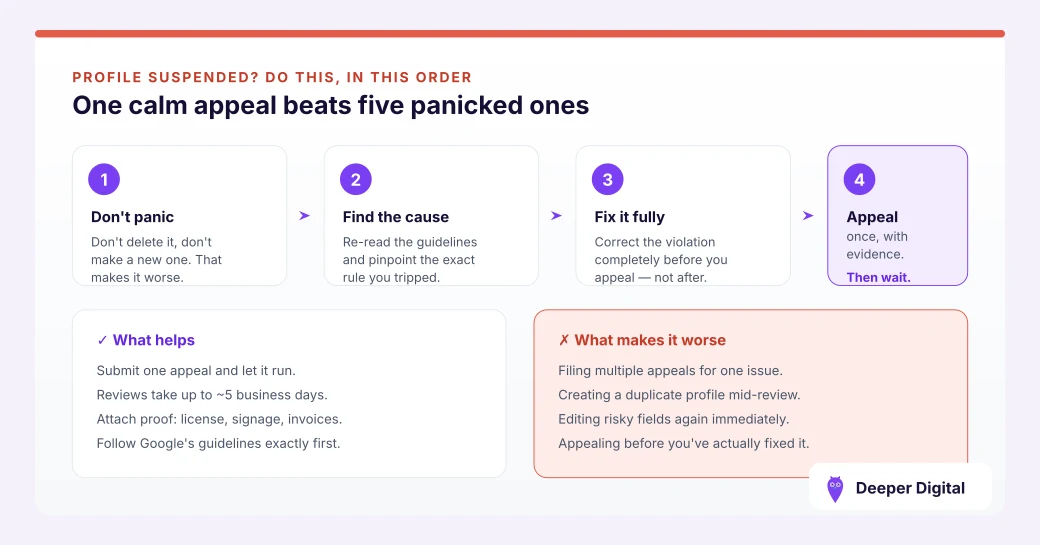
Don’t make more changes, and don’t create a new profile. Both are common panic moves that make things worse. Instead:
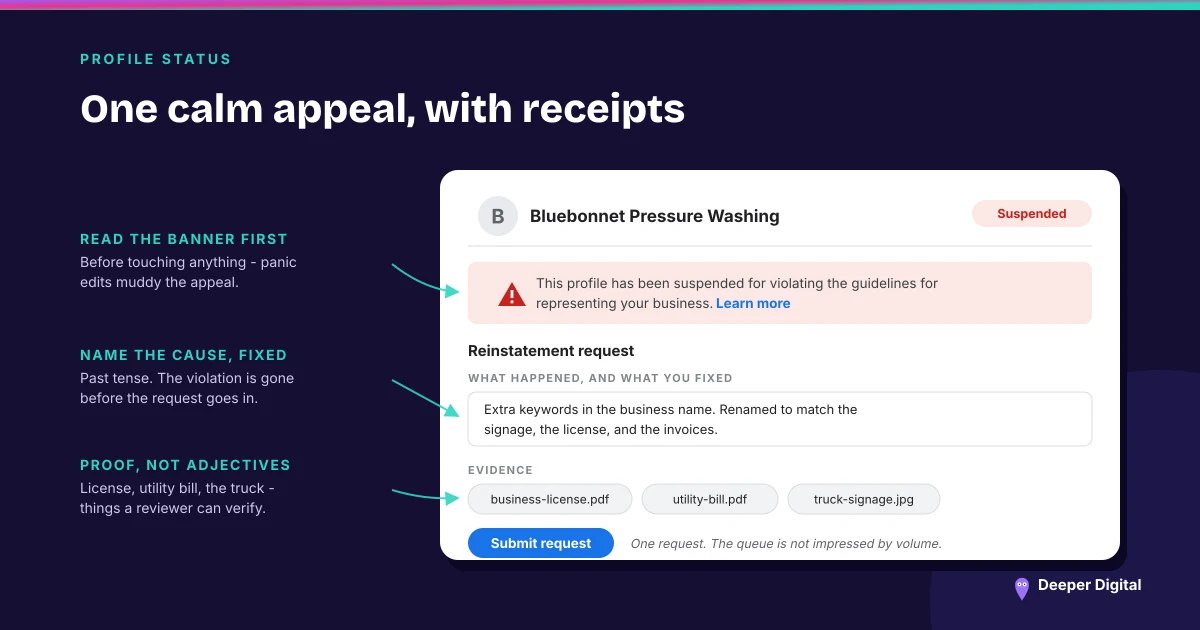
- Read Google’s guidelines for representing your business and honestly find the likely cause. Be your own toughest auditor.
- Fix the violation if it’s obvious — for example, remove keywords from the business name so it matches your signage and paperwork.
- Gather proof you’re a real business: a business license, a utility bill, a photo of signage or a branded vehicle, registration documents.
- Submit the reinstatement request through Google’s official fix suspended or disabled profiles form, calmly and factually, with your evidence attached.
How long does reinstatement take?
Google says appeal reviews take up to about five business days; in practice some stretch to a couple of weeks. It’s rarely instant.
The hard part is the waiting, because every instinct says go do something. Doing nothing is the something.
Submit one clear request and wait — spamming multiple requests slows things down and can hurt your case. If the first request is denied, you can appeal, ideally with stronger documentation.
What mistakes make a suspension worse?
Five panic moves reliably turn a fixable suspension into a permanent one:
- Creating a duplicate profile — now you have two problems and a duplicate-listing violation
- Making more edits while suspended, which muddies the picture
- Submitting request after request in a panic
- Lying or exaggerating in the appeal — they check
- Ignoring the actual cause and hoping it resolves itself
How do I avoid getting suspended again?
Keep the profile honest and stable. Real business name, no keyword stuffing.
Only categories and services you actually provide. Consistent information across the web — clean NAP.
Make changes deliberately, not in big simultaneous batches. Boring and consistent is exactly what Google wants to see.
Suspension quick response
The whole playbook in five lines — fix the real violation, gather proof, file one clean appeal:
- Don’t panic-edit and don’t make a second profile
- Identify and fix the real violation
- Collect proof you’re a legitimate business
- Submit one clear reinstatement request with evidence
- Keep the profile honest going forward so it doesn’t recur
A compliant, stable profile is the whole prevention plan — the full profile checklist is built to keep you on the right side of the rules, and if you’re weighing whether a cheap “SEO” service is worth the risk to your profile, read this first.
Keeping a profile compliant and stable is part of what we run for you — we’d rather prevent a suspension than argue one back. Want a careful review of your profile for risk? Free game plan here.
 NASP
NASP  Wild Foods Co.
  Noble Origins
  Cowboy Pools
  BT Biltong