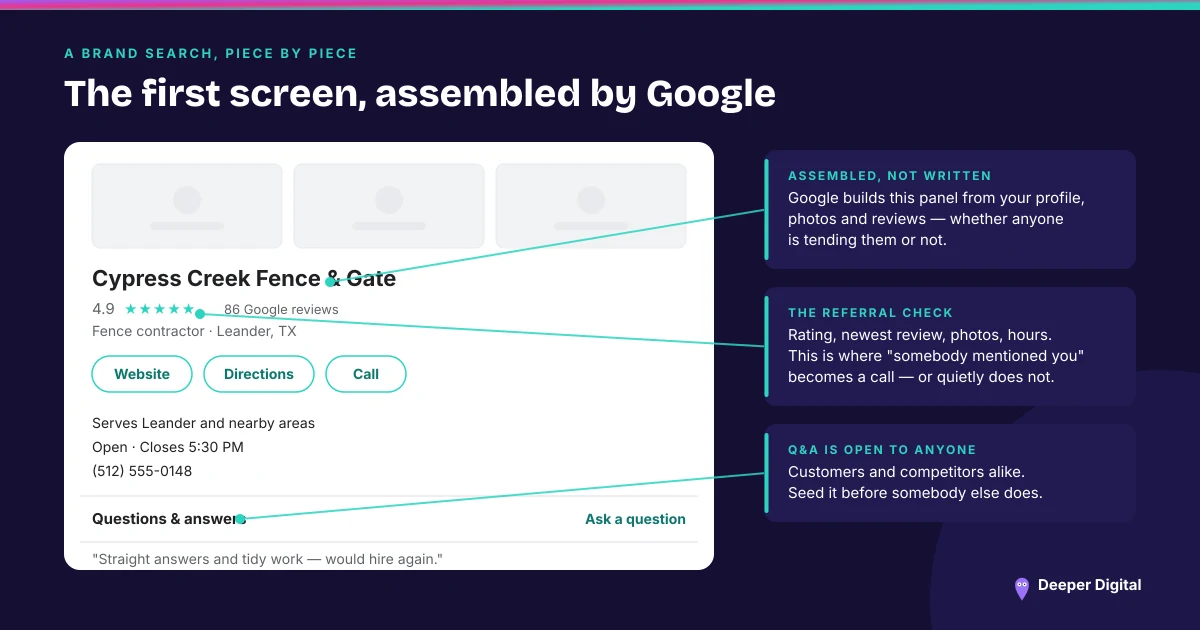
Your Google Business Profile is a record Google maintains, not a document you own outright. Strangers can suggest changes to it, Google can change fields itself using outside sources, and it may phone, text or message you to confirm details it has gathered. All of that is documented on Google’s own help pages, and most owners have never seen any of it.
Here is where each kind of change shows up, and what you can do about each one.
Suggested edits
Anyone using Google Maps can suggest an edit to a business they do not own or manage. The same mechanism lets a stranger add a business that is missing.
This exists for good reasons — a closed restaurant with stale hours is worse for everybody than a public correction — and it means your hours, category, address and closure status are all things a passerby can propose changing. There is no setting that opts you out.
Google updates
Separately from the public, Google updates profiles itself. Its help pages describe gathering information from sources such as user reports and licensed content, and updating a profile when those sources report that the current information is incorrect or outdated.
Two details in that documentation deserve attention. You get a notification and an alert in the Edit profile section when it happens. And Google says plainly that you cannot manage all Google updates through your Business Profile — some are simply applied.
The blue text
The tell is a color. In the profile editor, Google states that blue text shows information changed by Google, and that black or white text means no update from Google. A notification sits at the top of the page when updates are present.
That is a thirty-second check that almost nobody runs, on a screen almost every owner has open for other reasons.
The phone call
Google states that it may occasionally reach out using automated messages by call, text or WhatsApp to the verified phone number on a profile, in order to confirm business details, and that whatever you provide in response may be used to update the profile. It scopes this to select regions, languages and business categories.
Worth saying out loud: an automated call claiming to be Google, asking you to confirm your business details, is also exactly the shape of a long-running scam. The safe response to any such message is not to reply to it. Go to the profile editor yourself and read what is there. (The other calls that arrive claiming to be Google.)
Collected info
There is a screen for this, and it is the most useful one in this article. In the profile editor, under Collected info, Google lists the information it has gathered, along with the source of each item and the date it was collected. Individual items can be deleted.
One caveat from Google’s own wording, and it is the kind of thing that catches people out: deleting collected information removes it from Google’s records, but does not change other details already on your Business Profile. Removing the source does not roll back a field that was already updated from it. You still have to correct the field.
Particularly personal places
A quieter one. Google may designate a profile as a particularly personal place, mostly automatically, using data from websites, users and businesses, with some added manually.
Google states that this designation does not affect the profile’s visibility and does not reduce the ability of users to interact with it on Maps and Search, and it offers a form for feedback on the designation. For clinics and care providers who find the label and assume it is a penalty, that is the answer: it is not one.
Bulk uploads, if you run several locations
If you manage locations by spreadsheet, the interaction has rules. Google says a field left the same as your last upload is ignored, a field you change replaces both the previous value and any Google update attached to it, and a blank field may have an automatic update applied.
The consequence is worth stating: blanks invite updates. An empty column is not neutral.
What to actually do
Open the editor once a month. Look for blue. Read the Collected info screen and note the dates. Correct anything wrong at the field, not just at the source.
Then check the two fields that cause the most damage when a stranger gets them changed — hours and closure status — because both are visible to a customer standing outside your door. (Getting hours and holiday hours right in the first place.)
A profile nobody watches will eventually be edited by somebody who is not you. Watching for that, and correcting it inside the month, is part of the upkeep on every plan — and it is the least glamorous thing on any card.
 NASP
NASP  Wild Foods Co.
  Noble Origins
  Cowboy Pools
  BT Biltong