A star rating is one number. For service businesses, Google has been collecting several.
Its help page on reviews for service businesses, read 3 September 2026, documents a layer most owners have never looked at: when customers review a service business, they can rate specific aspects of their experience, and those ratings are collected and displayed on the profile.
Not every business gets this. Google’s eligibility line is that all businesses can be reviewed, but only certain service businesses will have aspects of customer experience collected and shared. There is no application and no opt-out.
Go and look at yours first
Google’s own steps, and they take under a minute:
- Open Google Search on a computer
- Search for your business, or select it on the map
- Scroll to Review summary
- Select an aspect — Google’s example is Price — to filter the reviews to it
Do that before reading the rest of this. What you find there is either a pleasant surprise or the most specific piece of customer feedback you own, and the second one is more useful.
The arithmetic, which is unforgiving in a specific way
Google describes three states for each aspect: positive feedback, critical feedback, and feedback unavailable — the last covering reviews where the customer did not select an aspect, and older reviews from before this existed.
The combined rating for an aspect is positive ratings divided by total ratings, with unrated reviews excluded from the denominator.
Read that exclusion carefully, because it inverts the usual advice. On your overall star average, volume protects you: one bad review among ninety barely moves the number. On an aspect rating, only the customers who commented on that aspect count at all. If four people mentioned price and one was critical, that is a 75% and there is no cushion of silent reviews to dilute it.
Small denominators move fast in both directions. Which is the one genuinely encouraging thing here: an aspect that looks bad today can look different after a handful of jobs done well, far sooner than an overall star average would budge.
The part you can actually control
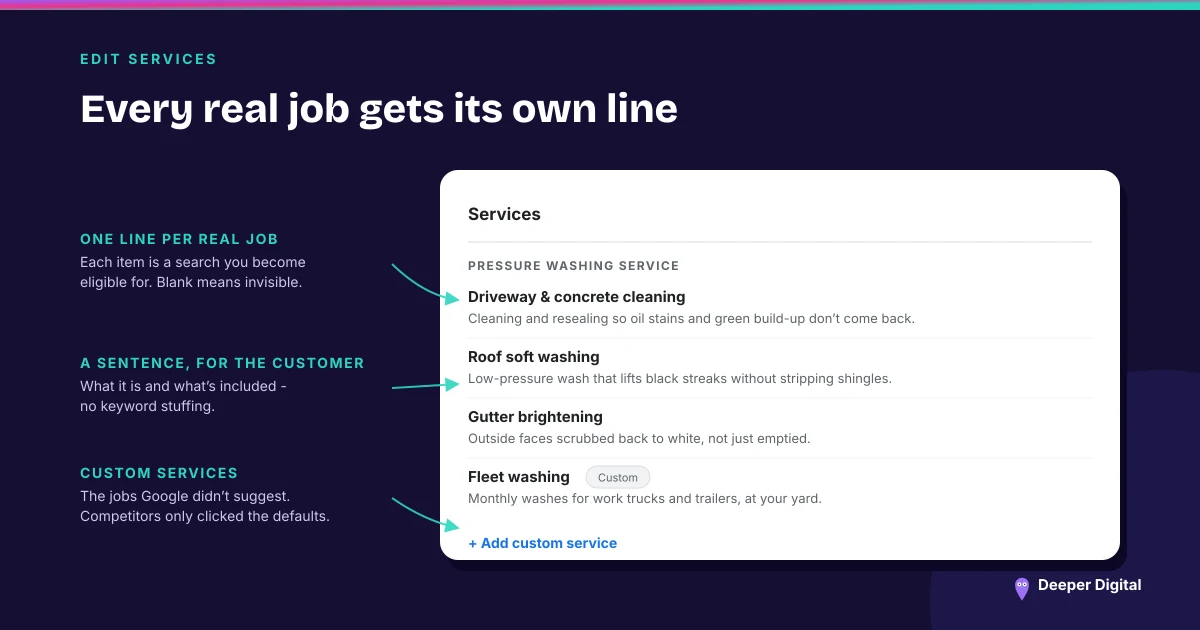
Here is the sentence worth the whole page. Google states that the tasks customers may be asked to identify — what work your business performed — come from the merchant’s service list, the website if available, or a standard list based on business type or other authoritative sources.
And then: if a job type is unavailable, merchants can add it to their service list in Business Profile Manager.
So the services list is not just a description of what you sell. It is feeding the vocabulary customers use to describe what you did for them, inside the review itself.
If your list says “detailing” and nothing else, that is roughly what comes back. If it names ceramic coating, paint correction, interior extraction and headlight restoration separately, the review can attach to the specific job — and the specific job is what the next customer is searching for.
This is a second, unadvertised reason to fill the services list out properly. The first reason was always that the list is a ranking surface in its own right, and most profiles leave most of it blank.
What you cannot control, so stop trying
“You’re unable to change the aspects customers are asked about.” Google’s words.
There is no configuration screen, no way to suppress an aspect that keeps coming back critical, and no version of this that responds to a support request. The only available lever is doing the thing better and asking more customers, which is a system rather than a campaign.
What to do with a critical aspect
Google’s own tip is to use the rating information and communicate with customers who rated aspects of your business poorly, to improve your service.
That is the honest version, and it is more useful than it sounds, because an aspect rating tells you which thing to fix. “Four stars” is a mood. “Positive on quality, critical on price” is a conversation you can have with yourself about how you quote.
Then reply to the underlying reviews. A critical aspect with a thoughtful reply beneath the review reads very differently from a critical aspect sitting in silence — and reply is the only part of a published review that stays under your control.
Check your Review summary today, then open your services list and add every job you actually do by name. The services list, kept complete and current, is on every plan we run.
 NASP
NASP  Wild Foods Co.
  Noble Origins
  Cowboy Pools
  BT Biltong