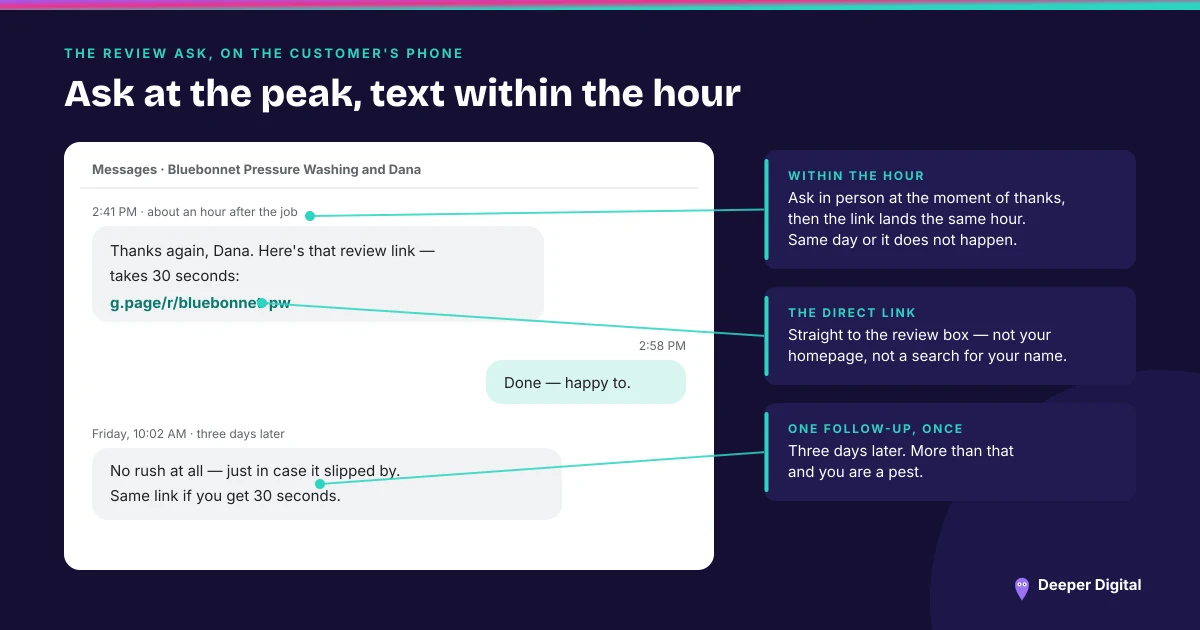
Google generates a review link and a matching QR code for your business, they live behind two clicks inside your own Business Profile, and most owners have never gone and got them. Read first-party on Google’s help pages on 30 August 2026, the path is: go to your Business Profile, select Read Reviews, then Get more reviews, then Copy.
That is the whole mechanic. This post is only the mechanic — the ask system that decides when you send it lives in a separate post, and the rules about who you may send it to live in another one.
Getting the link
Two clicks, as above. The screen gives you a short link you can paste into anything: a text message, an email signature, a booking confirmation, an invoice footer.
What you get back is a destination that opens the review form directly. The customer does not land on your profile and have to find the button; they land on the star rating with the box already open.
Getting the QR code, and the catch
The same screen carries the QR code. Google’s instruction for saving it is unusually literal: right-click the QR code, then select Save image as.
The catch is worth knowing before you try: Google states that review QR codes can currently only be generated on a computer browser, not on mobile devices. If you have tried this on your phone at the counter and concluded the feature does not exist, that is why.
Where Google itself says to put it
Google’s help page names four placements, and they are all points where the customer has just finished a good interaction rather than points where you happen to have space:
- On your receipts
- In thank you emails
- At the end of a chat interaction
- Printed and displayed in your store
It adds that requests can also go out by email, WhatsApp message or Facebook post. For a mobile business with no store to display anything in, the printed version becomes a card handed over at the end of the appointment, which does the same job in a driveway or a treatment room.
Why a link beats “look us up on Google”
This is the part that is not a technical detail.
“Search for us on Google and leave a review” asks a person to type your name, disambiguate you from a similarly named business two towns over, scroll to the reviews section, and find the write-a-review control. Every one of those steps is a place where someone who genuinely meant to help you stops.
A tapped link removes all four. The difference between the two versions of that sentence is not persuasion; it is the number of decisions between goodwill and a posted review. (The ask system that decides when the link goes out, and to whom.)
The one thing the link does not let you do
Making the ask frictionless makes it tempting to sweeten it, so the rule is worth restating in Google’s own words: reviews and other user contributions to Google Maps must reflect a genuine experience, and offering incentives such as free or discounted goods or services in exchange for reviews is considered fake engagement and is strictly prohibited. Google applies that to posting reviews, changing reviews and removing negative ones.
Sending everyone the same link is fine. Deciding who gets the link based on how happy they seem is a different thing entirely, and it has its own name. (What review gating is, and why the quiet version is still the same practice.)
We generate the link and the printed QR card as part of the review engine, keep the profile current, and answer every review that arrives. The tiers that include those are on the services page.
 NASP
NASP  Wild Foods Co.
  Noble Origins
  Cowboy Pools
  BT Biltong