Apple Business Connect is Apple’s free tool for claiming your place card, the listing iPhone users see in Apple Maps, Siri, Messages and Wallet. Apple introduced it in January 2023, registration is a self-service site and an Apple ID, and the card is yours to manage once Apple verifies the business. Most local businesses have never touched it.
The card already exists; the question is who controls it
Apple Maps has an entry for your business whether or not you claimed it, assembled from whatever data Apple gathered. Every iPhone that taps your address in a text, asks Siri for a business like yours, or navigates to you from the built-in maps is reading that card.
Unclaimed, it shows what Apple guessed. Claimed, it shows what you wrote: photos, hours, the actions a customer can take from the card. That gap is the whole pitch, and closing it costs nothing but the setup.
Why almost nobody claims it
Google gets the attention because Google is where the visible contest is, and the Apple card creates no urgency: no notifications, no competitor comparison, nothing nagging. So it sits unclaimed, which is exactly why the businesses that do claim it are ahead of their market.
There is a quieter reason it matters going forward: voice assistants and in-car systems that lean on Apple’s data answer from the card, not from your website. The card is what they can see.
An owned listing, in the useful sense
We drew the line recently between citations you own and citations you rent: the ones that persist because you hold the login, and the ones that vanish with a subscription. (The full argument.) Apple Business Connect lands firmly on the owned side: created once, held under your Apple ID, no recurring fee keeping it alive.
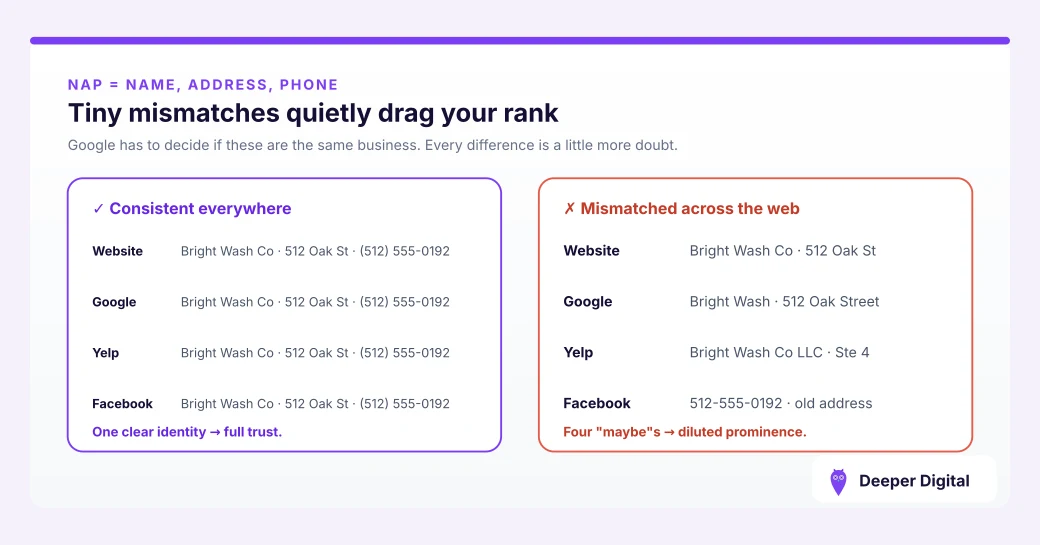
That also means the usual consistency rule applies with full force. The card’s name, address and phone must match your Google profile and every other listing exactly. The Apple card is one more public record that either agrees with the rest or quietly undermines them. (What consistency requires.)
Claiming it, briefly
- Go to Apple’s Business Connect site and sign in with an Apple ID (an existing one or one created for the business)
- Find or add the business, and complete Apple’s verification
- Fix the details first (name, address, phone, hours, category) before touching photos
- Add real photos and check the card’s “good to know” details against what Google shows
- Put the login wherever your other business credentials live, because the point is that you hold it
For a mobile business, the same discipline applies here as on Google: the card reflects how the business actually operates, and the address story matches everywhere.
The short version
Free, permanent, already being read by every iPhone in your market, and almost universally unclaimed. Claim it, make it match everything else, and hold the login.
Claiming the card and keeping its details in agreement with the rest of your listings is part of citation work. What that covers month to month is on the services page.
 NASP
NASP  Wild Foods Co.
  Noble Origins
  Cowboy Pools
  BT Biltong